
Protect your
from Email Spoofing Today
Easy DMARC Reporting for MSPs & IT Teams. Efficiently secure many domains using VerifyDMARC. Ensure legitimate emails reach inboxes and prevent spoofing.
Trusted by 130+ MSPs and IT teams across 14 countries to protect over 10,000 domains.
Instant 30-day free trial on any plan. No credit card required.
Start Free Trial
Check your domain is protected
Our free checker tool will give you actionable recommendations by analyzing your DMARC record, SPF record, TLS reporting record, MTA-STS record, MTA-STS policy file, DNSSEC status and DANE TLSA records.
Everything You Need to Secure Your Email

Stop Email Spoofing Before It Happens
Monitoring for loose DMARC policy and misconfigured TLS, strengthen your security.

MSP & Digital Agency Optimised
Generous domain limits and unlimited admin users for IT Teams managing many domains.

Setup DMARC in Minutes, Not Hours
Simple DMARC setup tool, verify your DMARC record quickly, today.

Manage All Your Domains in One Place
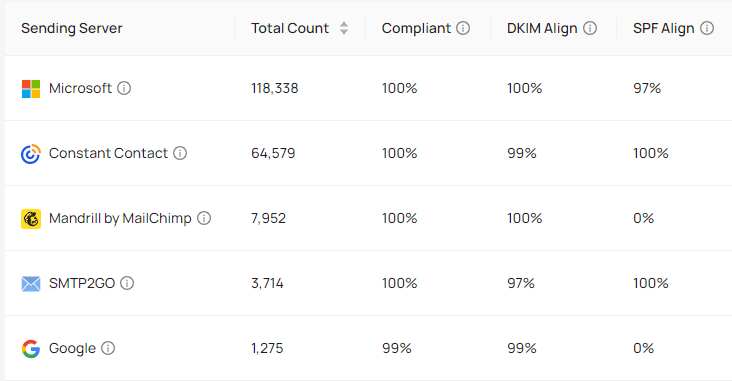
An analyzer for all domains under your management & their sending activity in one place.

Regression Alerts & Setup History
Receive actionable alerts if DMARC, SPF, TLS status downgrades or MX records change.

Single Sign-On for All Plans
No passwords. All plans can use Passwordless, Microsoft 365 or Google Single Sign-On.

Your Data, Your Control
Your data belongs to you only. We purge DMARC & TLS report data after 90 days.

Quick Onboarding with Bulk Import & Export
Seamlessly import your domain list with built-in deduplication using API or CSV.
Built for Simplicity and Speed
Our powerful interface is designed to get you straight to actionable data without the complexity. Spend a minimum amount of time managing DMARC, DKIM, SPF and TLS for your business.
Start Free TrialLatest Blog Posts
New Feature: Managed MTA-STS Hosting, Now in Preview
Enforce MTA-STS on inbound email with two CNAME records. VerifyDMARC hosts the policy, manages the certificate and updates the policy id for you.
New Feature: Scoped Users for Customers and Partners
Invite customers and partners into VerifyDMARC with read-only access limited to the domains you assign, and when to use a separate organisation instead.
Which Parts of Your SPF Record Are Actually Used?
The SPF Checker now shows Observed usage: which parts of each SPF record are matched by real email traffic, helping you spot stale entries.