
Introduction
MTA-STS stops attackers downgrading inbound email to an unencrypted connection. The DNS side is small, but the policy file has to be served over HTTPS at mta-sts.yourdomain. That means a web host, a certificate that keeps renewing, and remembering to change the policy id every time the policy changes. Those chores are often why domains stay on opportunistic TLS.
Managed MTA-STS Hosting takes them off your hands. It is now available as a preview.
How It Works
Setup starts in the MTA-STS section of the domain’s Domain Setup page, where you choose Managed or Self-hosted MTA-STS and see how much of your Managed allowance is in use.
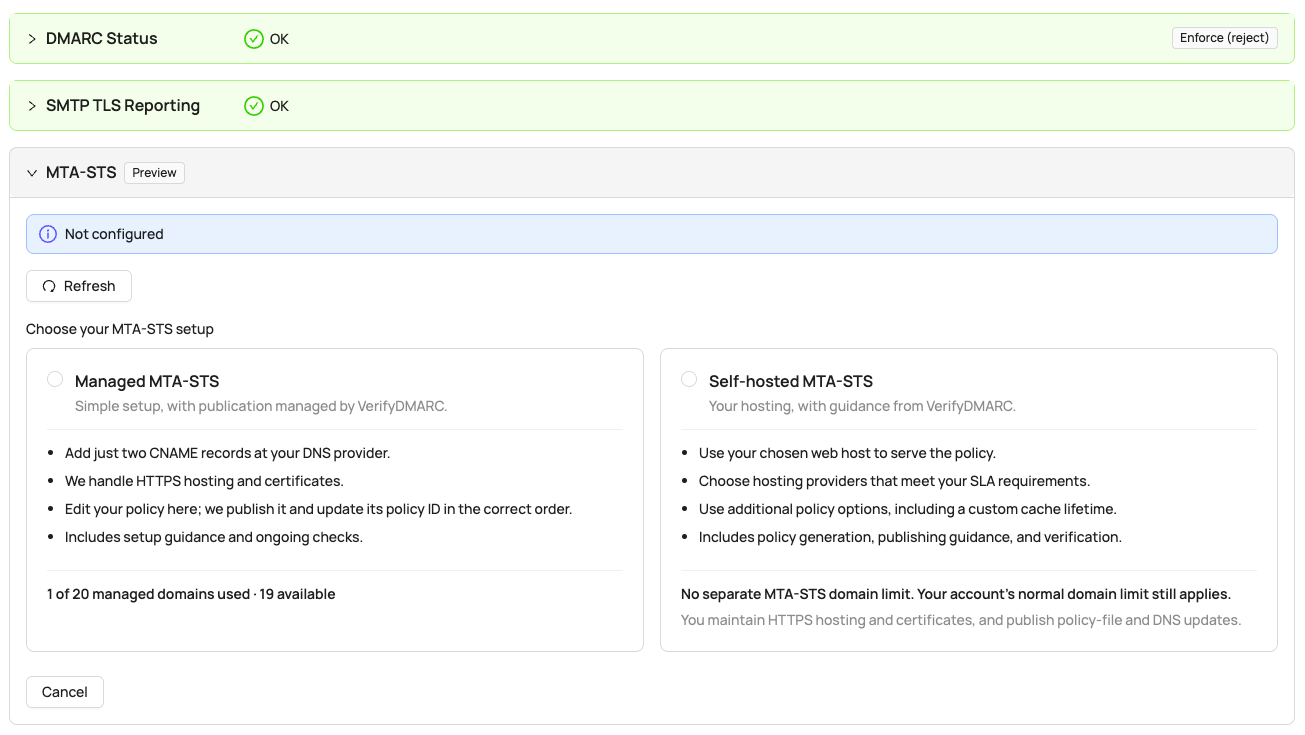
- Add two CNAME records at your DNS provider, one at
mta-sts.yourdomainand one at_mta-sts.yourdomain. The dashboard shows the exact targets. - We serve your policy at
https://mta-sts.yourdomain/.well-known/mta-sts.txton a certificate we manage. There is no web server or certificate for you to run. - Edit the policy in the dashboard. We publish the new policy, check it is live over HTTPS, and only then update the policy id, so senders never fetch a policy that is not there yet.
If a domain already has a live MTA-STS policy, you can move it to Managed hosting.
Built-in Safety
Enforcing MTA-STS tells senders to hold mail rather than deliver it unencrypted, so a mistake can delay or bounce inbound email. Managed MTA-STS Hosting is built to make that hard to do by accident:
- TLS reporting comes first. Setup unlocks once the domain has a valid TLS reporting record, so you can see how senders handle your policy before and after you enforce it.
- New policies start in testing mode, with a one-day cache lifetime (
max_age). Testing reports problems without holding any mail. - For domains that receive email. A domain needs at least one MX record (not a null MX) to use a Managed MTA-STS slot, so your allowance goes to domains that actually receive mail.
- Enforce cannot leave out a live MX host. The MX list is pre-filled from your current MX records, and an enforce policy that is missing one of them is blocked.
- Sensible cache lifetimes. Enforce policies use one week, two weeks or one month.
- Hourly checks. VerifyDMARC warns you if an enforce policy stops covering your live MX hosts, for example after a mail provider change. Turn on Domain Setup Regression Alerts to be emailed when it happens. As with any MTA-STS policy, the dashboard’s TLS Mode shows ‘MTA-STS Testing’ until you enforce, so a domain left in testing does not go unnoticed.
Prefer to Host It Yourself?
Choose Self-hosted MTA-STS instead. VerifyDMARC generates the policy file and the DNS records, including the TLS reporting record, for you to publish on your own web host. Self-hosted domains do not count towards your Managed MTA-STS allowance, and MTA-STS Setup Validation keeps checking them hourly as before.
Managed hosting is best-effort and has no availability SLA. Sending servers cache your policy for its max_age, so a short outage does not remove protection. If you need an SLA on the hosting itself, self-host the policy on infrastructure you control.
Plan Allowances
Self-hosted MTA-STS works on every domain your plan covers. Managed MTA-STS has its own allowance:
| Plan | Managed MTA-STS | Self-hosted MTA-STS |
|---|---|---|
| Personal | 1 | 10 |
| Starter | 2 | 25 |
| Medium | 10 | 100 |
| Large | 20 | 200 |
Larger plans with higher allowances are available. Email us if you need more.
Getting Started
Open a domain in VerifyDMARC, turn on TLS reporting if it is not on already, and choose Managed MTA-STS. See the MTA-STS setup documentation for each step. It is in preview, and we would love your feedback at support@verifydmarc.com.
New to MTA-STS? Is DANE Right for Your Inbound Email Security? compares it with DANE, and the free TLS checker shows where any domain stands today.
Not a VerifyDMARC customer yet? Sign up for our 30-day free trial, no credit card required.