
Introduction
SPF records only ever seem to grow. A new CRM gets an include, a mail-merge tool gets another, an agency adds their provider for a one-off campaign, and a vendor’s “recommended” mechanism gets pasted in just in case. Removing anything feels risky, so nothing is ever removed.
Today we’re introducing Observed usage in the SPF Checker. For every domain, VerifyDMARC now shows how much of each SPF record has been matched by real email traffic over the last 90 days, so you can finally see which parts of the record are earning their place and which are stale entries worth investigating.
The Problem: SPF Records Accumulate, They Don’t Shrink
There are two good reasons to care about a bloated SPF record:
- The 10 DNS lookup limit. SPF allows a maximum of 10 DNS lookups per check. The
include:,a,mx,ptrandexists:mechanisms all count, as does theredirect=modifier, and nested includes count too. Go over the limit and receivers returnpermerror, which can cause SPF to fail for all your mail. Many organisations sit at 8 or 9 lookups with no idea which entries they could reclaim. - Unnecessary authorisation. Every mechanism in your record authorises someone to send mail using your domain as the envelope sender. An include for a provider you stopped using two years ago still authorises that provider’s entire sending infrastructure, which on shared platforms can mean thousands of other customers’ messages passing SPF for your domain.
The reason these entries survive is simple: nobody can say with confidence that they’re unused. Observed usage gives you that evidence.
How Observed Usage Works
Observed usage draws on the real email traffic reported for your domains to work out which parts of each SPF record are actually in use. There’s nothing to configure and no change to your DNS.
The SPF Checker now shows an Observed column for each domain, for example 3 of 9, meaning traffic was observed for 3 of the 9 mechanisms in the record over the last 90 days. Expanding a record highlights the mechanisms that are actively in use, and hovering over a mechanism shows the detail: how many messages matched it, from how many source IPs, when it was last seen, and the sender behind it.
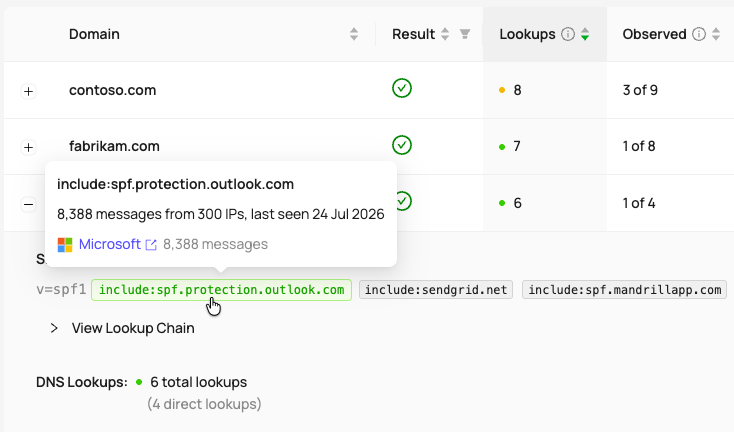
The Observed column and mechanism hover detail in the SPF Checker
What “No Observed Traffic” Does and Does Not Mean
A mechanism with no observed traffic is not automatically safe to remove. The 90-day window can miss:
- Low-volume or seasonal senders, like an annual renewal run or quarterly statements.
- Failover and backup services that only send when something else breaks.
- Internal or transactional systems whose recipients don’t send DMARC reports.
- Newly added domains that haven’t had time to accumulate reports yet. The longer a domain has been reporting, the stronger the evidence.
Treat the Observed column as a shortlist for investigation, not a delete list. Confirm with the system owner before changing DNS, and keep an eye on Regression Alerts after any change. What the feature removes is the guesswork: instead of auditing nine includes, you’re verifying two.
Real-World Scenarios
Scenario 1: The migrated provider. A client moved from one email platform to another two years ago, but the old include was never removed. Observed usage shows no messages matching it in 90 days. After confirming the migration is complete, you remove the include and reclaim a DNS lookup.
Scenario 2: Approaching the lookup limit. A domain sits at 9 lookups and the client wants to onboard a new sending service. Rather than resorting to SPF flattening, the Observed column shows two includes carrying no traffic, giving you candidates to verify and retire first.
Scenario 3: Auditing an inherited record. An MSP manages a client domain with an inherited SPF record and no documentation. As reports accumulate, the Observed column builds a picture of which entries reflect real sending activity, replacing guesswork with evidence you can review at your own pace.
Getting Started
Open the SPF Checker in your VerifyDMARC dashboard and the Observed column is already there. There’s nothing to turn on, and it’s included with all plans.
For more detail, see the SPF Checker documentation.
This release also added Digest emails and DKIM Selector Alerts, two new optional notifications worth turning on.
Not a VerifyDMARC customer yet? Sign up for our 30-day free trial, no credit card required, and see which parts of your SPF records are earning their place.